 |
 |
 |
       | ||
| ||||||
 |
|
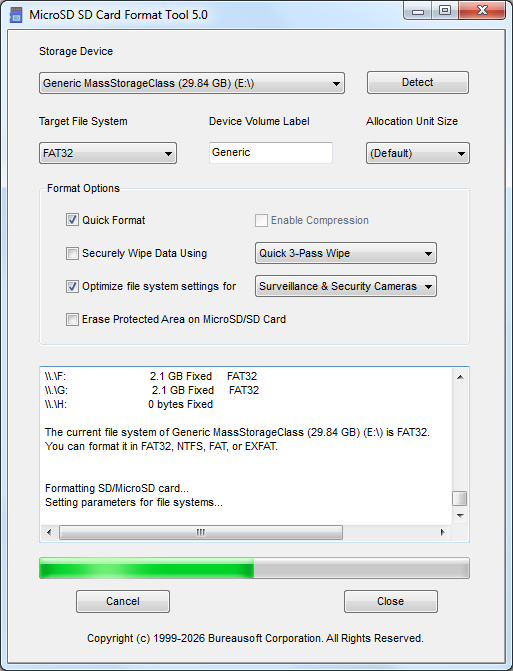
The software formats all types of SD memory cards and optimizes file systems according to use cases, such as for drones, gaming consoles, dash cams, cameras, security, surveillance, smartphones, tablets, portable music players, video players, ebook readers, GPS navigation systems, startup devices, boot loader, industrial switch, routers, and home appliances, in a safe way that replaces Windows Format operations. The software reduces data corruption and enables faster access to the cards. SD cards are classified by capacity into four main types: SD (up to 2GB), SDHC (2GB-32GB), SDXC (32GB-2TB), and SDUC (2TB-128TB). SDHC uses FAT32, while SDXC/SDUC utilize exFAT for high-speed data access. Choosing depends on device compatibility and storage needs (e.g., 4K video requires SDXC/SDUC). Some dash cams require FAT32 for MicroSD, SD, SDHC, and SDXC. Unfortunately, the largest FAT32 volume that Windows can create is 32GB for most MicroSD cards and SD cards. The volume is too big for FAT32 is the common error message reported by Windows. This software is created to solve the problem. The software provides quick and easy access to the full capabilities of your MicroSD memory cards and SD memory cards. The software is designed specifically for memory cards using MicroSD, SD, SDHC, SDXC, and SDUC standards. It is strongly recommended to use the MicroSD SD Format Tool software instead of formatting utilities provided with operating systems that format various types of storage media. Using generic formatting utilities may result in less than optimal performance for your memory cards, and on certain devices, they may result in data corruption. All MicroSD and SD memory cards have a Protected Area on the card for the SD standard's security function. The security function in the protected area of an MicroSD/SD card, known as CPRM (Content Protection for Recordable Media), is a hardware-based security layer designed to prevent unauthorized copying of copyrighted, high-value data, such as paid media or proprietary, highly sensitive corporate information, by using mutual authentication. MicroSD SD Format Tool software does not format the "Protected Area" by default, unless you choose the option to erase the protected area with the software. Key Aspects of the Protected Area Security Function SD Card Capacity Types Form Factors Key Differences Compatibility
System Requirements Windows 11 What's new in version 5.0 Better protect SD Protected Area from damage.
Looking for a Transflash and TF card format tool? (C) 1999-2026 Bureausoft Corporation All rights reserved. |
|
 |